- Date
Headshot Poses: 15 Natural Poses for LinkedIn & Corporate Photos (2026)
15 poses · 2026
Headshot poses: 15 natural poses for LinkedIn & corporate photos
A pose-by-role cheat sheet for men and women, what works in a tiny LinkedIn circle – and the 10 selfie angles to upload for AI headshots.
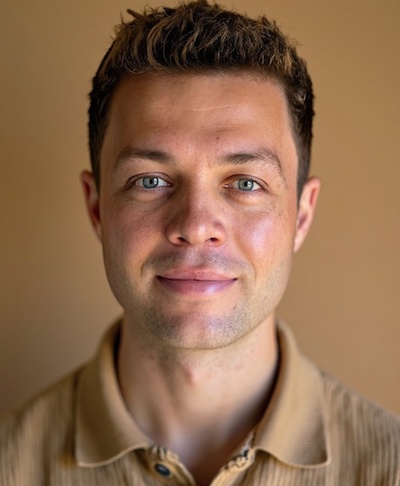
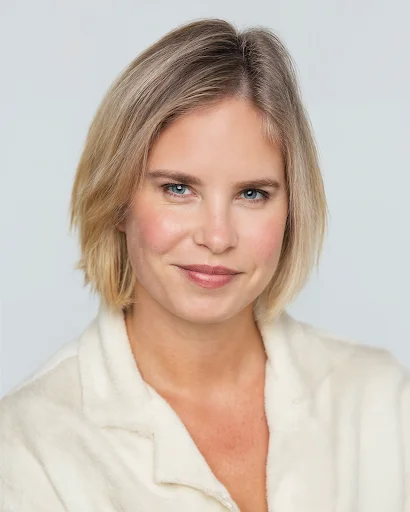
Photo: real AI headshot created with Headshots.so
Last updated: November 9, 2026 · By Andreas, Headshots.so · Prices live-checked on headshots.so November 9, 2026
The best headshot poses are small: a 45° shoulder turn, chin forward and slightly down, and a relaxed closed or open smile. Big gestures that look great in a full-body shot disappear – or look awkward – once LinkedIn crops you into a small circle. Below are 15 natural poses, which ones suit your role, and a simple test to pick the winner.
Quick answer
- 📐Default pose: shoulders at 45°, face to camera, chin forward and slightly down.
- 😊Closed smile for law, finance and boards; open smile for sales, HR and teaching.
- 🔍For LinkedIn, only head and shoulders survive the circle crop – arm poses matter for website and team pages.
- 👩Headshot poses for women and men are mostly the same; the difference is in crop, posture and wardrobe, not rules.
- 🤳For AI headshots, upload about 10 selfies with varied angles (front, slight left, slight right) and expressions.
- ✅Headshots.so: 54–150 headshots from $29 with a 100% satisfaction guarantee.
2,400
US monthly searches for «headshot poses» (Google Ads data, pulled Nov 9, 2026)
590
for «headshot poses female»
480
for «headshot poses male»
$0.47
per headshot on our Basic plan ($45 / 96)
01What are the best headshot poses?
Our list runs from the most universal (top) to the most specialised (bottom). Each tag shows where the pose fits best.
The 45° turn Corporate · all
Shoulders turned about 45° from the camera, face turned back to the lens. Slims the frame and looks instantly professional.
Chin forward & down All
Push your forehead slightly toward the camera, then tip the chin down a touch. Defines the jawline and removes the double-chin angle.
Squinch All
Lift the lower eyelids very slightly, as if looking into soft sunlight. Reads as confident instead of startled.
Soft closed smile Corporate · finance · law
Lips closed, cheeks lifted. The safe default for banks, law firms and boards.
Open smile Sales · HR · teaching
Teeth showing, relaxed eyes. Approachable for client-facing roles.
Arms crossed, relaxed Founders · consultants
Loosely crossed, hands not gripping. Works in half-body crops, not in tight LinkedIn circles.
One hand in pocket Men · executive
Weight on the back foot, thumb out. Classic for website team pages.
Hand to chin (light touch) Creative · speakers
Fingers barely touch the chin, wrist away from the lens. Keep it subtle or it looks staged.
Lean on a table Women · men · coaching
Forearms on a table, upper body leaning slightly forward. Signals engagement.
Over-the-shoulder look Actors · creative
Body turned away, head turned back. Strong for portfolios, too dramatic for most résumés.
Seated, slight lean Remote teams
Sit on the front half of the chair, lean 10–15° forward. Great for Zoom-style headshots.
Standing tall, square on Executive · board
Shoulders square, posture straight, neutral expression. Authority pose for annual reports.
Head tilt (5°) Women · coaching · healthcare
A very small tilt reads as warm; more than about 10° starts to look casual.
Walking toward camera Outdoor · personal brand
Mid-step, eyes on the lens. Needs a burst of photos – or an AI that generates the variations.
Laughing mid-moment Personal brand · teams
A real laugh, then a second frame as it fades. The fading frame is usually the keeper.
💡 The 3-pose rule
Pick three poses from the list: one universal (1–3), one that fits your role, and one wildcard. Shoot or generate all three, then run the thumbnail test below.
02Which pose fits your job? Pose-by-role matrix
Our own recommendations, based on how each industry typically presents its people on LinkedIn and company team pages.
| Role | Best poses (#) | Expression | Crop |
|---|---|---|---|
| Lawyer, finance, board | 1, 4, 12 | Closed smile | Head & shoulders |
| Sales, account manager | 1, 5, 9 | Open smile | Head & shoulders |
| Founder, consultant | 1, 6, 11 | Confident, slight smile | Half body for website |
| Creative, speaker | 8, 10, 15 | Expressive | Half body |
| Healthcare, coaching, HR | 2, 5, 13 | Warm open smile | Head & shoulders |
| Actor | 3, 10, 2 | Neutral + smile versions | Tight head shot |
| Remote & hybrid teams | 1, 11, 5 | Friendly, consistent | Same crop for everyone |
📏 LinkedIn sizing still matters
LinkedIn shows your photo as a circle and asks for at least 400 × 400 px. Poses that rely on arms or hands are lost at that size. See our LinkedIn profile picture size guide.
03Headshot poses for women vs. men: what actually differs?
Very little in the pose itself. Poses 1–5 work for everyone. What tends to change is posture and crop: a slight head tilt (pose 13) and a table lean (pose 9) are popular in women's headshots, while one hand in a pocket (pose 7) and a square-on stance (pose 12) are common in men's executive portraits. Choose the pose that fits your role and personality, not your gender. For outfits, see what to wear for headshots.
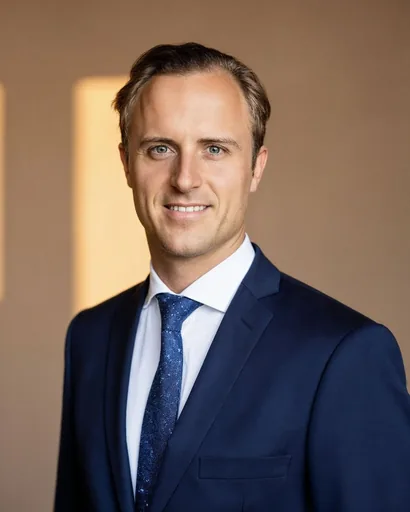

Real results from Headshots.so. Browse more on the examples page.
The 100-pixel thumbnail test (5 steps)
Shortlist three photos
One per pose. Same lighting, so you compare the pose – not the light.
Crop to a circle
Use any phone editor. Head and shoulders should fill about 60% of the frame.
Shrink to 100 × 100 px
That is roughly how big you appear in LinkedIn comments and search results.
Ask two people
«Which one would you reply to?» Not «which is prettiest».
Keep the winner everywhere
LinkedIn, résumé, email signature and Slack – same photo builds recognition.
04How do you pose for AI headshots?
With an AI headshot generator you do not need to hold 15 poses. The AI learns your face from your selfies and generates the poses and outfits for you. What matters is giving it varied, sharp input:
- ✓About 10 clear selfies – Headshots.so says 10 is enough, quality beats quantity.
- ✓Mix of angles: straight on, slightly left, slightly right, chin a little up and down.
- ✓Mix of expressions: closed smile, open smile, neutral.
- ✓Daylight on your face, no sunglasses, no heavy filters, no other people in the frame.
- ✓Different tops and backgrounds across the set, so the AI does not lock onto one look.
More detail in the best selfies for AI headshots and how to be photogenic.
| Plan | Price | Headshots | Styles | Cost per headshot* |
|---|---|---|---|---|
| Starter | $29 | 54 | 9 | $0.54 |
| Basic (78% pick this) | $45 (was $55) | 96 | 16 | $0.47 |
| Premium | $69 | 150 | 25 | $0.46 |
* Our calculation: price divided by number of headshots. Prices from headshots.so, November 9, 2026.
“The best headshot pose is the one that still looks like you at 100 pixels.”
FAQ: headshot poses
What is the most flattering headshot pose?
For most people: shoulders turned about 45° from the camera, face turned back to the lens, chin forward and slightly down, with a relaxed smile.
Should you smile in a professional headshot?
Usually yes. A closed smile suits conservative industries; an open smile suits client-facing and people roles. Make one of each and test them.
Where should I put my hands in a headshot?
In a tight LinkedIn crop, hands are usually out of frame. For half-body photos, try loosely crossed arms, one hand in a pocket, or forearms resting on a table.
What are good headshot poses for women?
Poses 1–5 plus a small head tilt (13) or a table lean (9). See our headshots for women page for examples.
What are good headshot poses for men?
Poses 1–5 plus one hand in a pocket (7) or a square-on executive stance (12). See headshots for men.
What if I'm not happy with my AI headshots?
Headshots.so offers a refund within the first 7 days as long as you haven't downloaded any photos and your selfies followed the guidelines (see the terms).
Get every pose without holding one
Upload about 10 selfies and get 54+ professional headshots in 10–30 minutes. From $29 · 100% satisfaction guarantee.
Create your headshotsAlso see corporate headshots, executive headshots, pricing and team headshots for companies.